Advertisements
Concentrating on studying has never been as challenging as it is today.
Between constant phone notifications, social media consuming precious hours, and the difficulty of organizing a consistent routine, studying can become an almost impossible task. But don't worry!
There is a light at the end of the tunnel: apps designed specifically to help you improve your focus and productivity.
Can you imagine transforming your mobile phone from a distracting enemy into a powerful study ally? These apps are here for just that.
In this article, we'll explore how technology can work in your favor, optimizing your study routine and helping you achieve your academic goals.
Get ready to dive into the world of apps that promise to organize your life in ways you never even imagined possible.
The Challenges of Studying in the Digital World
Who hasn't found themselves scrolling through their Instagram feed when they should be studying?
We live in a world full of distractions, and staying focused can seem like an almost impossible mission.
Studies show that it takes about 23 minutes to regain focus after an interruption. Imagine how much time is lost throughout the day!
On the other hand, technology also offers powerful tools to combat these distractions.
Using study apps could be the key to transforming your study time into something truly productive.
Read also:
- Daily Airline Ticket Deals: Tips and Essential Sites
- How to Protect Your Data Using Apps
- The Impact of Apps on Our Daily Lives
- How augmented reality is redefining entertainment
- Optimize your cell phone's battery easily
Read on!
How Apps Can Help Organize Your Studies
Organizing time and tasks is essential for academic success.
These are some ways apps can make a difference:
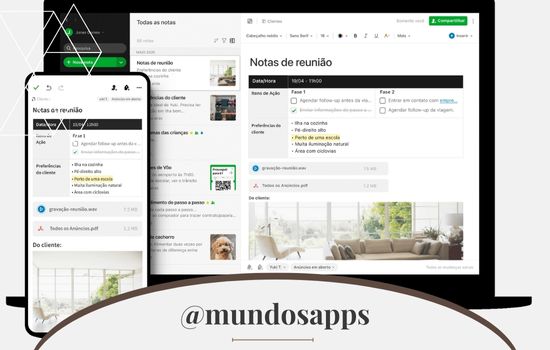
- Task planningApps like Evernote let you create to-do lists and organize your day with ease.
- Study schedulesWith tools like Quizlet, you can create flashcards and schedule regular reviews.
- Weather monitoringStopwatch apps help measure how much time you're spending on each activity.
An interesting example is the possibility of scheduling specific reminders to review the learned content.
This ensures that you not only memorize, but also deeply understand the topics studied.
Concentration Techniques Aided by Apps
Have you heard of the Pomodoro Technique? It consists of dividing study time into 25-minute blocks, interspersed with short breaks.
This helps maintain focus and prevents mental exhaustion. Many apps, such as Forest, facilitate the adoption of this technique.
Another technique is to use audio or ambient sounds to create an atmosphere conducive to learning.
Apps like Noisli offer relaxing sounds that help block out external distractions.
Sounds like rain, wind, or even the murmur of a coffee can create a more comfortable environment for studying.
Finally, some people prefer to combine concentration techniques with guided meditation.
Apps like Headspace can help in this regard, teaching mindfulness techniques that increase focus and reduce anxiety.
The Best Stopwatch and Pomodoro Technique Apps
- Forest
- Visual stimulation to keep you focused.
- Create a “virtual forest” while you focus on your tasks.
- Rating: 4.8/5 on the App Store and Google Play.
- Focus Keeper
- Simple and intuitive.
- Ideal for applying the Pomodoro method.
- Rating: 4.6/5.
- Tide
- Combine Pomodoro techniques with relaxing sounds.
- Rating: 4.7/5.
These apps help you stay on track during your study session, guaranteeing strategically placed breaks to recharge and maintain productivity.
Applications for Creating Mind Maps and Reviewing Content
If you're a visual person, you'll love using mind mapping apps to organize your ideas and review content.
These are some options:
- MindMeister: Intuitive tool for creating collaborative mind maps.
- SimpleMindIdeal for organizing ideas simply and effectively.
- CogglePerfect for students who need to share mind maps with classmates.
These tools are ideal for those who need to organize complex information more clearly.
A well-designed mind map can transform hours of study into minutes of efficient review.
Tools for Sharing Notes and Collaborating with Colleagues
Studying in groups can be much more efficient with the use of collaboration apps. Here are some suggestions:
- Google KeepPerfect for creating and sharing notes.
- OneNoteIt offers advanced features for organizing virtual notebooks.
- NotionA versatile platform for managing projects and sharing information.
Sharing notes helps to gain different perspectives on the same topic.
In addition, working as a team allows you to identify points that you might not have noticed on your own.
Tips for Balancing Technology Use and Focus on Studies
Although apps are excellent tools, it's important not to rely exclusively on them.
Here are some tips for balancing technology and concentration:
- Define specific times for the use of applications.
- Avoid using your mobile phone for other activities during study time.
- Combine the use of apps with offline methods, such as taking notes on paper.
- Use "do not disturb" mode to avoid interruptions.
To maximize productivity, you can also schedule breaks away from screens. This will give your eyes a rest and help keep your mind fresh.
Application Details: Analysis and Recommendations
Let's delve into the details of the applications mentioned to help you decide which one is best suited to your needs.
- ForestMore than just a timer, Forest uses a playful approach to encourage focus. Upon completing a concentration period, you plant a tree in your virtual forest. Some users report that the visual aspect helps them maintain focus for longer.
- QuizletIdeal for students of all ages. Flashcards allow for quick and efficient review. Plus, you can access content created by other users, optimizing your preparation time.
- EvernoteOne of the most comprehensive apps for getting organized. With features including text, audio, and image notes, it's perfect for those who need to manage large volumes of information.
What are users saying?
“Forest changed my study routine. Before, I would get distracted by my phone every five minutes. Now I can concentrate for hours.” — Ana, Forest user.
“Quizlet is amazing for reviewing. The flashcards really helped me prepare for exams” — Lucas, university student.
“I use Evernote to organize all my notes. It’s very practical and helps me find everything quickly.” — Mariana, a student in the civil service exam.

Conclusion
Now that you know the best apps to improve your concentration and productivity while studying, why not try one of them? Choose the one that best suits your needs and see how your study routine can be transformed.
Remember: the key to success is discipline, and technology is here to help you on this path.
Share this article with your friends and discover together how studying can be more efficient and even fun.
If you have a favorite app that we didn't mention here, leave your suggestion in the comments. Let's enrich this list together!
Download Links
Frequently Asked Questions (FAQs) about Study Apps
1. What are study apps and what are they used for?
Study apps are digital tools designed to facilitate organization, learning, and focus. They help manage tasks, plan schedules, review material, and improve productivity through techniques like the Pomodoro Technique or mind mapping.
2. Are study apps effective for all ages?
Yes, they are useful for students of all ages, from elementary school to university, and even professionals who need to organize their time and study for certifications or courses. The important thing is to choose the right app according to individual needs.
3. Do you have to pay for these apps?
Many apps offer free versions with basic features that are sufficient for most users. However, some have paid options that unlock advanced features, such as customization, integration with other tools, or ad removal.
4. How can I stay focused while using apps on my mobile phone?
To avoid distractions, activate "Do Not Disturb" mode on your device and use apps that block other notifications, such as Forest or StayFocusd. Also, set specific times for using your phone and prioritize study tools over social media.
5. What is the difference between a study app and a traditional planner?
Study apps combine features like reminders, progress tracking, and cross-device syncing, making them more versatile than a traditional planner. Many also include interactive resources such as flashcards and mind maps.
6. What should I do if an application does not meet my needs?
If an app doesn't work for you, try other options until you find the right one. There's a wide variety on the market, from simple timeline tools to full-fledged platforms like Notion or Evernote. Read reviews from other users to make an informed decision.
7. What are the main benefits of using study apps?
The benefits include time savings, improved focus, access to innovative educational resources, and the ability to personalize learning techniques to suit your preferences. They also foster discipline and organization in your daily routine.
8. How can I combine study apps with traditional methods?
You can use apps to plan and manage your time while taking notes or doing paper exercises. This combination lets you get the best of both worlds: the flexibility of digital tools and the in-depth focus of traditional methods.